
An application password lets a third-party app connect to your WordPress site through the REST API without you sharing your main login. WordPress powers tens of millions of sites, and these passwords keep external access limited and safe.
Key points: application passwords are a limited, secure way for services to reach your site via the REST API; create a unique one per service to control access; and document and review them regularly.
What an application password is
An application password is a unique, randomly generated key used to connect third-party services to your WordPress site securely. Unlike your normal login, it only grants the access you allow. For example, to connect a scheduling tool like Hootsuite, you create a dedicated application password instead of sharing your login. That limits the tool’s access, and a breach on its side can’t be used to control your site. It also lets you track API requests per app, which makes troubleshooting easier.
You can use one with Agility Writer’s Post to WordPress feature.
Step-by-step: generate an application password
- Confirm your site runs WordPress 5.6 or higher, where this feature is built in.
- Log in to your WordPress dashboard and go to Users in the left sidebar.
- Click the user you want to generate a password for.
- On the Edit Profile screen, scroll to the Application Passwords section.
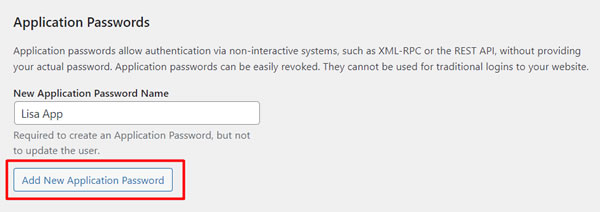
- Enter a descriptive name in New Application Password Name, such as “My Third-Party App”.
- Click Add New to generate the password.
- Copy the generated password right away, since WordPress won’t show it again.
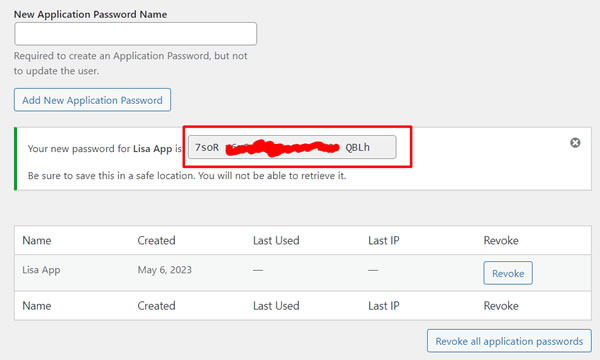
- Paste the password into your third-party service to authenticate.
- Repeat for any other user accounts that need their own passwords.
Why application passwords help
Better security: a third-party app’s access is restricted to the permissions you set, so even if that service is breached, the credentials can’t log into your site directly.
More control: you decide which apps connect and what they can touch. A plugin that needs user data gets a password scoped to that, and nothing more. With native support, you can create as many passwords as you need without new user accounts or custom REST API code.
Wrapping up
Creating an application password is a small step that meaningfully improves your site’s security and your control over third-party access.
This article was written in Advanced Mode, fact-checked, and polished with Grammarly.