
The Smart Editor polishes, humanizes, and expands drafts in one place. Adjust tone, readability, and point of view, remove AI-ish phrasing, split long paragraphs, summarize, or continue writing in the same voice. Select any part of the article to open AI Shortcuts, or use Ask AI for precise, custom edits and new sections. Generations are unlimited on paid plans, within fair use.
Feature
Smart Editor: Polish & Optimize Faster
Polish drafts fast: adjust tone and point of view, remove AI-ish phrasing, split or summarize paragraphs, and continue writing in the same voice.
★★★★★ 4.7 (33+ Trustpilot)
5,000+ active users
Articles in minutes
15+ years SEO consulting
The Problem
First drafts need a second pass, and it's slow by hand
Even a strong draft has robotic phrasing, dense paragraphs, and the wrong point of view in places. Fixing all of it manually across many articles is the real time sink.
AI-sounding phrasing that needs softening line by line
Long paragraphs that hurt scannability
Tone and point of view that drift from your brand
Why Teams Use It
What Smart Editor gives you
Cleaner, more human copy
Humanize robotic phrasing and remove AI-ish words in a couple of clicks, without rewriting from scratch.
Right voice, right perspective
Switch point of view and tone, then continue writing in the same style so the whole piece stays consistent.
Tighter structure
Split dense paragraphs or summarize sections so the article is easier to scan and read.
How It Works
Smart Editor in 4 steps
01
1
Open Smart Editor
From the article details or history, click Edit Article.
02
2
Highlight text
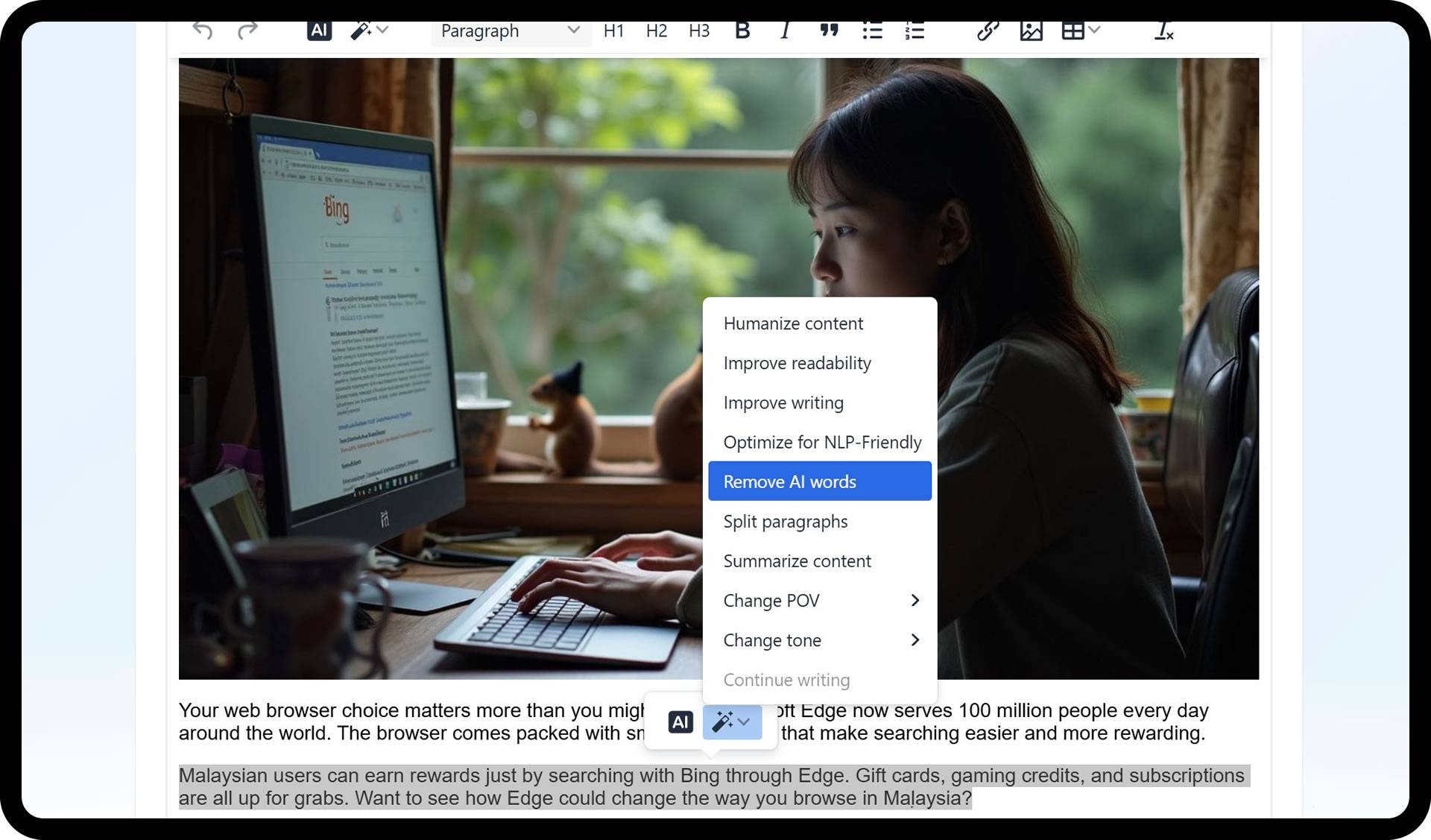
Selecting any text reveals AI Shortcuts: humanize, readability, improve writing, NLP-friendly, remove AI words, split, summarize, change point of view, and change tone.
03
3
Use Ask AI for custom edits
Ask AI in plain English to rewrite more engagingly, swap jargon for simpler words, or add an FAQ or conclusion.
04
4
Finish and publish
Publish when it's right. For WordPress, heavy HTML can trip the block editor, so use Classic Editor or copy and paste for clean output.
What's Included
Everything in Smart Editor
Humanize content to soften robotic phrasing
Improve readability and writing with clearer phrasing and grammar
Optimize for an NLP-friendly style
Remove AI words using project-level negative words or defaults
Split paragraphs and summarize sections
Change point of view (I, We, You, They) and tone (Casual, Confident, Direct, Friendly, Professional)
Continue writing in the same style, no selection needed
Unlimited generations on paid plans (fair use)
Got Questions?
Smart Editor FAQs
How do I access the Smart Editor?
Open your article and click Edit Article in the details or history view.
What is the fastest way to improve a paragraph?
Highlight it and use Humanize, Improve Readability, or Improve Writing from AI Shortcuts.
Can I remove AI-sounding phrases?
Yes. Use Remove AI Words, which applies your project-level negative words or the defaults.
Will Ask AI use live SERP data?
Not by default. When you add new sections via Ask AI, it relies on internal knowledge, so provide data for the best quality.
Any tips for publishing to WordPress?
If the block editor misreads complex HTML, publish via Classic Editor or copy and paste to clean it up.
More Features
Explore more of Agility Writer
Smart Writer
Go from idea to publish-ready draft with proven defaults. Pick a type, add a topic, review the outline, and generate, with no parameter tweaking.
Templates & Writing Modes
Pick a mode for speed or control, then a template that matches the job, and generate long-form content that's ready to rank.
G-Smart Optimizer
Audit any article against Google's quality guidelines, auto-improve it in Enhance, Extensive, or Research mode, then compare versions and verify the lift.

Available now, start in under 2 minutes
Ready to try Smart Editor?
Start your $1 trial. 5 credits, full access to Smart Editor and every other Agility Writer feature.
Cancel anytime
Credits roll over
Trustpilot 4.7/5