
New: Smart Writer, Context-Aware Visuals, Site Structure Audits

Push Articles Straight from Agility Writer to WordPress

Connect one or many WordPress sites, auto-save images, schedule in bulk, and push SEO meta to Yoast, Rank Math, and AIOSEO. No copy-paste.

★★★★★ 4.7 5,000+ users $1 trial, cancel anytime

WordPress Integration feature illustration
★★★★★ 4.7 (33+ Trustpilot)
5,000+ active users
Articles in minutes
15+ years SEO consulting

What is WordPress Integration?

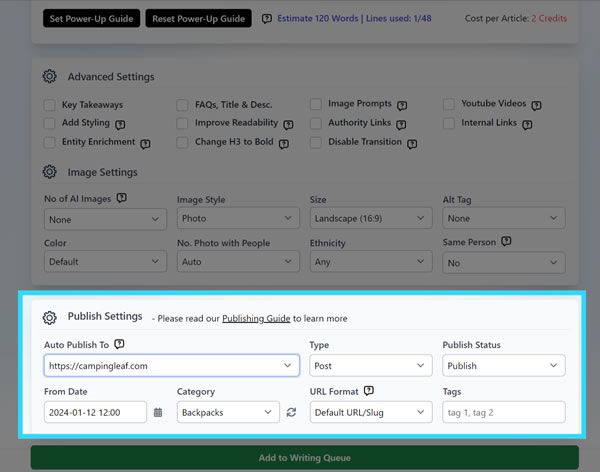
Install the Agility Writer WordPress plugin, paste your API key, and you're connected. Pick Posts or Pages, categories, slug style, status, and tags, then schedule once, across a range, or a fixed number per interval for hands-free publishing. You can also auto-publish the moment an article finishes, or update existing posts in place.

WordPress Integration workflow detail

Everything you get with WordPress Plugin

Bulk scheduling: once, range, or fixed number per day, week, or month

Auto-populate meta title, description, and keywords for Yoast, Rank Math, and AIOSEO

Images auto-saved to your WordPress media library

Update existing posts without manual paste

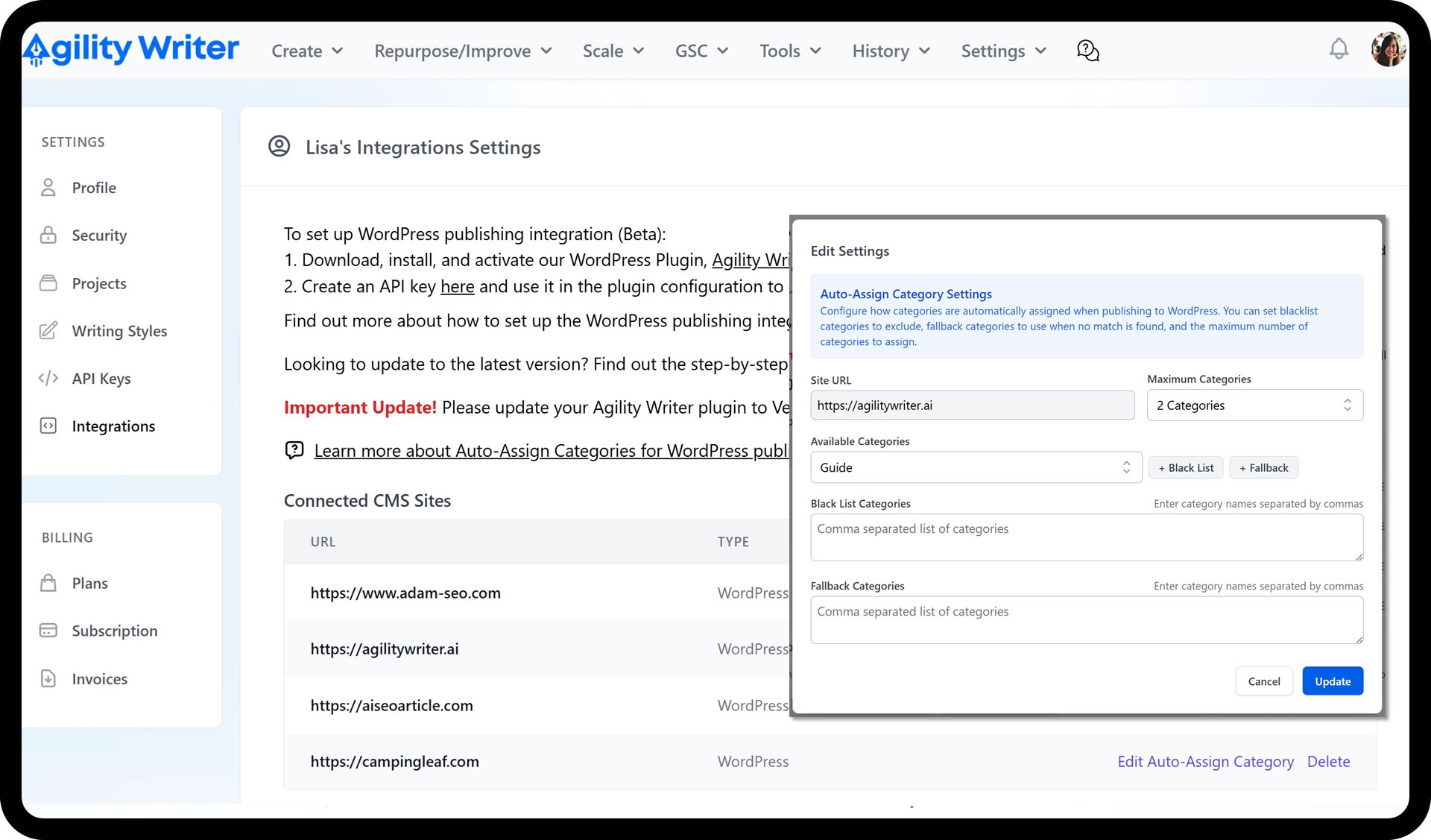
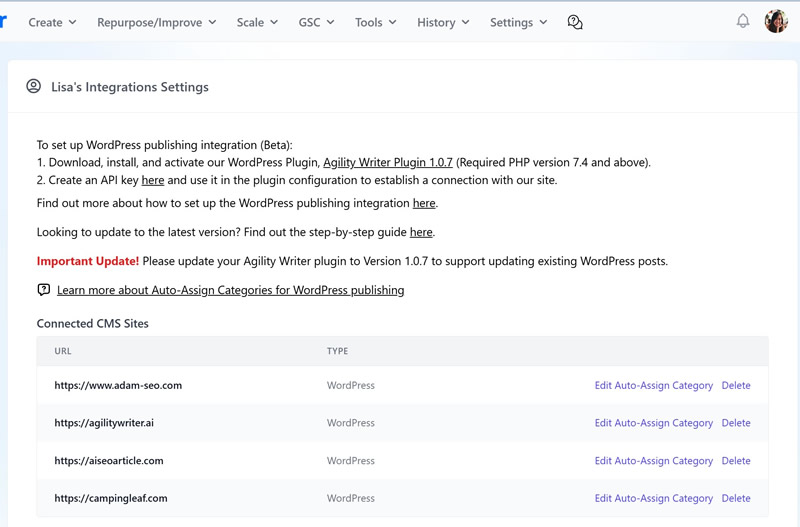
Multi-site support with per-batch destination

Legacy REST API route for hosts that can't run the plugin

WordPress Integration screenshot 1
WordPress Integration screenshot 2
WordPress Integration screenshot 3

How WordPress Plugin runs in practice

01
1

Install and connect

Download and activate the Agility Writer plugin, generate an API key in Agility Writer, paste it into the plugin, and save. Requires WordPress 5.6+ and PHP 7.4+.

02
2

Choose what to publish

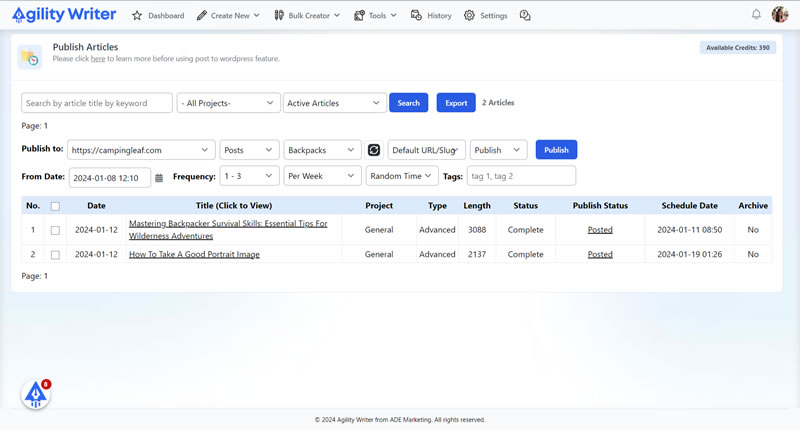
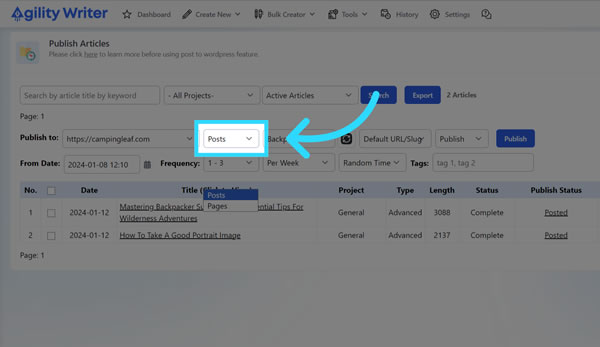
Go to Publish Articles, select your connected site, choose Posts or Pages, and pick a category if you're publishing posts.

03
3

Set URL, status, tags, and timing

Pick a slug style (Default, Full URL from keyword, or Full URL from title), set Draft or Publish, add tags, then schedule: once, a range, or a fixed number per day, week, or month at preset or random times.

04
4

Run now or auto-publish on completion

Click Publish to queue the batch, or turn on auto-publish inside each writing mode's Publish Setting so finished articles ship themselves, meta included.

The WordPress integration removes the last manual step in the pipeline: getting a finished article out of the writer and onto your site with its images, formatting, and SEO meta intact. Connect once, then publish, schedule, or auto-ship every batch from inside Agility Writer.

What gets handled for you

Every push creates a post or page with the full set of fields populated: title, body, featured image, categories, tags, and slug. Images are saved straight to your WordPress media library rather than hotlinked, and meta title, description, and keywords land in Yoast, Rank Math, or AIOSEO automatically.

One caveat worth knowing: if you also run the “Auto Upload Images” plugin, exclude https://app.agilitywriter.ai from it (or remove it). The Agility Writer plugin already stores images locally, so pulling them a second time creates duplicates.

Scheduling that matches how teams publish

Batch publishing isn’t one-size-fits-all, so the scheduler gives you three patterns:

  • Once — push the whole batch at a chosen start date and time.
  • Range — publish a random amount per interval, useful for a natural-looking cadence.
  • Number — publish a fixed count per day, week, or month, at preset or random times.

Add the slug style (Default, Full URL from keyword, or Full URL from title), Draft or Publish status, and tags, and the queue runs itself. For fully hands-free operation, enable auto-publish inside the writing mode’s Publish Setting; articles go live the moment generation finishes. Generate the batch with Bulk Generation, point it at the right site, and the pipeline runs end to end.

Multi-site for agencies

Connect each client site once with its own key, then choose the destination per batch. Writers and freelancers never need WordPress admin credentials, and revisions go out through the same connection via “update existing posts.”

If you can’t run the plugin

There’s a legacy REST API route: create a User Application Password for an Editor or Admin account, and if your host blocks external requests, whitelist IP 147.182.249.40 on the firewall. On this path you can rely on “Auto Upload Images” to pull images from app.agilitywriter.ai after publishing.

Requirements for the plugin route: WordPress 5.6+ and PHP 7.4+.

Run a WordPress Plugin job on a $1 trial

5 trial credits, full feature access, and cancel anytime. Test WordPress Plugin on your own keywords before you commit to a plan.

  • 5 trial credits, no contract
  • Cancel in two clicks, anytime
  • Credits roll over on annual plans

Why pick WordPress Plugin over the alternatives

Zero friction to publish

One connection, then schedule or auto-publish in bulk. Images are saved to your own server automatically.

SEO-ready posts by default

Meta title, description, and keywords are inserted into Yoast, Rank Math, and AIOSEO on every push. Nothing to paste.

Built for multi-site teams

Connect several sites once and pick the destination per batch. Update existing posts when a revision is ready.

What customers say about Agility Writer

★★★★★

"We went from 0 to 50,000+ organic visits in under 6 months using Agility Writer. The Topical Map Helper and auto-SEO features saved hundreds of hours of manual optimization. It's not just an AI writer, it's an entire content strategy tool."

M
Marcus T.
Content marketing agency
★★★★★

"Bulk Mode let us launch a programmatic SEO site with 180 articles in a single weekend. NeuronWriter scores landed above 80 on every piece without re-edits."

P
Priya R.
Affiliate marketer
★★★★★

"After our HCU drop, G-Smart Optimizer flagged the exact passages Google was penalizing. The before/after diff made the rewrites obvious, and we recovered 60% of lost traffic in two months."

J
James W.
SEO consultant, UK

WordPress Plugin FAQs

How do I connect a WordPress site?
Install and activate the Agility Writer plugin, generate an API key in your Agility Writer account, paste it into the plugin settings, and save. That's the whole setup.
Does it work with Yoast, Rank Math, and AIOSEO?
Yes. Meta title, description, and keywords auto-populate for all three plugins.
Can I update existing posts?
Yes. Updating existing WordPress posts is supported, so revisions ship without manual paste.
What if I use the Auto Upload Images plugin?
Exclude https://app.agilitywriter.ai or remove that plugin to prevent duplicate images. The Agility Writer plugin already saves images to your media library.
How flexible is the scheduling?
Publish everything at once, a random amount within a range per interval, or a fixed number per interval. Intervals run per day, week, or month at preset or random times.
What are the minimum WordPress and PHP versions?
WordPress 5.6 or newer and PHP 7.4 or newer.
Available now, start in under 2 minutes

Ready to try WordPress Plugin?

Start your $1 trial. 5 credits, full access to WordPress Integration and every other Agility Writer feature.

Cancel anytime
Credits roll over
Trustpilot 4.7/5